Showing posts with label Google. Show all posts

Tuesday, 10 September 2013

G+/Blogger integration, still not there, can we get some real features please?

// It's amazing what insignificant updates make news these days. Up until now, after hitting "Publish" on a new Blogger post, you were prompted to also post it on G+. Now you have an option and this will be done automatically. That's it. That's a new feature, announced on the official Blogger blog, filling up tech news sites and my G+ feed.
Left: post on Blogger. Right: post on G+
So here I am, testing Blogger again, and not much has changed since the last time I was here. I see that some problems remain:

1) Comment management: There is no central place to see all comments (on Blogger and G+ since these are (or more accurate, you can set it this way) the same thing now). You only have a list of posts an a comment count next to them. So you do not have a way to find if an old post has a new comment recently.

That said, if you had shared a Blogger post as a G+ post you get a notification on G+ for new comments but that's it. Comments from re-shares do not produce notifications (from what I have seen, correct me if I'm wrong). Finally, from what +Jean Abraham reports you get a G+ notification when someone comments directly on a post and +Gideon Rosenblatt reports that you get a G+ notification for shares (even if you didn't share it initially on G+?)

2) Smaller real estate on G+ feeds: Your full post (the text of it) is not posted on G+, forcing people to click through to get to the article. Unless you learn to write amazing first paragraphs, you've just lost a large part of your audience (Yes, people love easy stuff! Amazing insight: the easier you make it for people to read your content, the more people will read your content :)). In addition, your smaller thumbnail image has to compete with large photos from "real" G+ posts, some even taking up both columns of the feed.

I really can't see what's stopping Google from doing a full integration of the two services. Full Blogger posts on G+. Your blogspot.com can remain are your categorised archive and holder of "static" Pages content. A real comment management control panel (see WordPress, Disqus, etc). Am I asking too much? :)


Friday, 22 March 2013

Quora, a Google+ blogging alternative?


// I generally detest article headlines that pose questions rather than provide a definite position, but I'm undecided on this one.Recently, #Quora upgraded their Boards feature, renaming the Blogs. The standard features include:
- a quora.com subdomain of your choice
- set a title, logo/avatar image and #blog description
- choice of set of basic categories that show up on the right side of the pages, acting as navigation links to your blog's archives
- categories are linked to Quora existing set of topics
- your blog posts can be linked to either your main categories or other Quora topics
- limited HTML editor for your posts
- statistics on views per post, with monthly archives, including which specific users viewed your posts
- multiple authors per blog allowed
- easy posting via the mobile app
- you can use your Quora credits to promote your posts
- your posts show up in the home pages of people who follow the topics of your posts
- up/down voting and comments on posts
- choice of 2 quite elegant themes (see the default one in the screenshot of my blog)

I've been using #Google + as a blogging platform, so here's how it compares:
- an existing audience: no need to build up a fellowship through Circles or join #Communities (to which you can't cross-post). Tagging to Quora's topics will give your posts a chance to being visible to hundreds if thousands of topics.
- a topic-based audience: the G+ experience is based on following people, while on Quora on following topics
- a different audience: while G+ tries to market itself as everything for everyone, it is mainly focused on images, from great photography to silly GIFs. Quora is focused on text and analysis (top currently trending topics are "smart people", "human behaviour" and "computer programming") which, as you can imagine, has implications on the topics that have the bigger audiences. Quora also has a small army of admins and reviewers who have created a culture of quality content. If you have such content, it should thrive on Quora
- a better editor: although limited ( no source editing), you have an actual HTML editor, can add multiple images anywhere in your post and can have actual links not just drop URLs in your text.
- social propagation: on G+ people can re-share your posts, increasing your audience. Comments and +1's though are mainly done on the copied posts. On Quora, there is no sharing feature (posts have Facebook and Twitter share buttons of course) but when someone follows your blog or a post (similar to subscribing to the comments) or comments to / votes up a post, a related "story" is shown on the user's followers home page as well as the user's profile page.
- statistics: on G+ you have no statistics on whether your posts where read at all. You can only get a total view count on your photos based on third-party sites that use the G+ API or through Picasa. On Quora you get a full listing of who viewed (if they have turned on the related privacy setting) each posts, and how many views you have today as well as per month.

So where do all that leave me with the original question? As you can guess from all of the above, I'm quite positive about it. Of course, I'm not replacing G+ with Quora, I'll be cross-posting though, you can find me (and see a live example of how the system works) here http://bit.ly/g-quora
In the end, I think there is indeed a big difference in the audiences of the two platforms, so there is no harm done from the "both" choice. What do you think? :)


Friday, 15 March 2013

Google Reader is dead, long live Feedly


// As I was writing (http://bit.ly/YvRWmi) when the #GoogleReader death was announced, the race is on for a new king of #RSS readers. 

Of the 4 that I tried the last 2 days, here's the outcome: 
- The Old Reader: imported everything (but only current copies of the feeds, not the Google #Reader archive (which has about 1000 more unread article  and works fine (with the exception of photos on the Shorpy feed but that is something none of the readers get right)
- Netvibes: imported everything including the article archive but the interface is not very appealing 
- NewsBlur: in order to manage the extra load, they reduced their capacity of 64 feeds to 12 for the free account so that case is dropped for me.
- #Feedly: imported all feeds and article archive, has an excellent interface with multiple choices for layouts and an additional great free app for iOS and Android. 

So, thank you #Google  for introducing me to a great service, Feedly :) http://www.feedly.com/
And now for some obligatory Hitler rage on the issue http://bit.ly/XEczDn

Thursday, 14 March 2013

Google Reader's death is an opportunity, but for who?


// So #Google is killing Google Reader, messing with the image they have been building for years that "Google can do everything for everyone". #Reader has been the definitive #web-based #RSS reader service for years. That said the race is one for it's replacement. And things are not looking good in terms of instantly responding to demand. Here is my experience so far: 

The Old Reader imported 3 out of 20 subscriptions and is giving my a message that the rest are being imported in the background. That was some 40 minutes ago. The 3 subscriptions are loading fine though, with the exception of photos on the Shorpy feed  http://theoldreader.com/

Netvibes imported all of my subscriptions but loading feeds is very slow or does not happen at all at the moment http://www.netvibes.com/

NewsBlur hasn't managed to complete the import process after several tries and often gives out 502 error pages http://newsblur.com

Feedly (Chrome extension) imported all subscriptions with ease, but has a problem loading up all the many little images that uses in it's interface and basically you can't use it much http://www.feedly.com/

If you have found another service that does not directly connect to #GoogleReader but instead can import #OMPL files, you can export your Reader subscriptions to OMPL on Google Takeout here https://www.google.com/takeout/#custom:reader

So how are you dealing with this? 

Saturday, 16 February 2013

The Ultimate Browser Detection Fail


// So here's a screenshot from #Google #Nexus , running Google's #Android browser, showing a page on a Google service (Google Groups). We notice two things happening: 

1) Google's page can't identify Google's browser correctly and instead mistake it for #Safari
2) Google engineers can't (or wont?) make a page of relatively simple (in terms of features) web service to run on Safari, one of the two biggest mobile browsers, disregarding the fact that both browsers use the same engine.

I've recently switched from Safari to #Chrome due to better memory usage but these kind of ridiculous "games" really need to stop...

Sunday, 3 February 2013

Cross-network social media engagement analysis


// Did that sound complex enough? :) Statistics and trying to do comparisons can often be misleading as just seeing the numbers below can prove. The numbers are from a test +Wil Wheaton did: he asked people on #Facebook  and #Google + to following a list to his blog as a test on how much traffic he gets from either #network . Here they are:  

Facebook followers: 95K
Google+ followers: 1.4M
 
Traffic from Facebook:  ~13,428
Traffic from G+: ~11,261

Interactions on Facebook: 1118 likes and 345 comments
Interactions on G+: 647 +1s (same as likes) and 247 comments

On first look, FB looks like an amazing way to get engagement given that there were more interactions with just tiny fraction of followers. I think a crucial explanation for these numbers is that every like and comment on Facebook generates a story in the feeds of the friends of the user who made the like or comment.

This allows a much bigger spread of anything that get a good amount of likes/comments (as recently proven by the recent "help me get laid for 1 million likes" story http://cnet.co/YMy5pc). Meanwhile, the main way for something to spread on G+ is shares and the trending list (although usually in order to get on the trending list you need a lot of shares).  

Where as a percentage of the 1.4mil of G+ followers might see Wil's post just once if they have him on a circle which shows 100% of posts in the main stream (and if they read everything on their stream), on Facebook, it's not just a percentage of the followers who see a post in their feeds. It is also the friends of everyone who liked and commented on it through the "X commented on Will Wheaton's post" stories. 

An additional insight: a small page I manage on FB has just over 1100 likes. The overal potential audience though (friends of fans) is over 400k. I suppose some similar numbers apply in Will's case. His 95K followers can translate to an audience of millions. I wont do the math because I am probably going to end up with wrong assumptions again. 

The fact is, people interact differently with content and also discover differently  content on either network. So the whole situation is a bit like, well, apples and oranges :) 
_(Photo by Michael Fawcett http://bit.ly/12k6EE1)_
cc +Robert Scoble as he has written a lot about the differences between FB and G+ and their content discovery models. 

Thursday, 31 January 2013

History: G+ Activity Log for the rest of the Web


// I recently wrote http://bit.ly/Vx6wiE asking for a #Google+ activity log, a page where you could see all the posts you +1ed or commented on. The problem is, if someone doesn't interact with the post after you, you can't easily find it. 

It turns out something like this is on the works. +Shamil Weerakoon pointed me to the direction of the #Google #HistoryAPI. Announced back in June of last year at Google I/O, it promises to allow websites to post updates of actions you take around the web to Google's archive. If the concept sounds familiar it is because #Facebook has already done with #OpenGraph http://bit.ly/YG2e9B

The History #API is still in development but you can get a taste of it already. You can have in a single page, the archive of pages you +1ed around the web (not G+ posts), videos you viewed on YouTube, apps you got from Google Play, photos from Instant Upload and searches you have made (although that last one hasn't appeared on my page so far). People concerned with #privacy  should be reassured by the fact that you can select per source who can see your history (i've set everything to "only me"). 
 
Click here to learn more http://bit.ly/WARdDg and here http://bit.ly/WzOOce to sign-up. And here's another #googleplusrequest : Do the obvious, integrate this with Google posts and comments! :)

Wednesday, 16 January 2013

Your most popular G+ photos


// A lovely use of the #Google+ #API  : Go to  http://www.googleplussuomi.com/thumbs.php?id=109098983561044225374 and replace the ID number with the number of your profile (you can figure out by going to your profile and seeing the address of the page). You will get your (public) photos sorted by popularity!
Via +Klaus Herrmann and +Jeff Sullivan. Created by +Jari Huomo 

Monday, 14 January 2013

Google adding synonyms and intent in the search for the perfect match


// For some time now, #Google has not been taking your searches... literally. Your keywords will of course be used but Google will also add in the mix the correct spelling of the words you used (if you made an error) as well as synonyms or related words (think "cat" when you search for "pet")

But Google is going further, analysing what people click for each search and determining users' intention. E.g. watching a video when you just search for "U2". This can go to an extreme like also giving you Best Buy pages when you search for another electronic site (see screenshot).

What to do about it? Use Google #Keyword  Tool http://bit.ly/UYKnWx and see which search terms people are using. Combine it with your Google #Analytics  report about through which keywords people end up on your site. 

Use also Google #Trends http://bit.ly/VFwcry to see if your website topic is part of a large audience over time or not and decide if you should expand or focus your coverage.
 
Read more on this article http://selnd.com/W3zwcp by +Vanessa Fox on +Search Engine Land 

Sunday, 30 December 2012

G+ statistics via Webmaster Tools Author Stats


// I had previously http://bit.ly/W8U6r2 written about adding your #author information in your content so that your name can show up next to Google search engine results of your website and #Google+ posts. 

What I hadn't included though is that Google's #WebmasterTools  have a "Author stats" report with traffic #statistics of the pages that Google has correctly indexed as authored by you. The interesting part is that your Google+ posts are included in this, so you actually have some analytics on your G+ activity (unlike Facebook if you only use a personal profile). 

If you have previously added your authorship information to your pages, this link http://bit.ly/Wd9Klr should give you the report. 

Google+: Reshared 1 times
Google+: View post on Google+

Thursday, 11 October 2012

Romney Self-Googlebombed!


// Apparently if you search on #Google images for "completely wrong" you get tons of photos of Mitt Romney. It's not an old-style #googlebomb but just a regular search engine... feature. This result comes probably from Romney's recent statement that he was "completely wrong" on his characterizations of 47% of americans...

Google search link: http://bit.ly/VQqLGt
Link to statement: http://usat.ly/WSck2T

Google+: View post on Google+

Monday, 19 March 2012

What the Plus! Free for 6 5 hours!


+Guy Kawasaki teamed up with +Samsung USA to offer his new book on #Google + What the Plus! as a free PDF download. What the Plus! is a collection of articles on making the best out of G+

Get it here http://yousend.it/whYuAr (the link will expire in about 5 hours, after that you can find it on Guy's page http://bit.ly/FQQPqU )
(Found via +ScienceSunday)

Google+: View post on Google+

Sunday, 4 March 2012

Social Media tracking with ThinkUp


There are various solutions (with varying paying options) if you want to monitor your #social network efforts but there is also an open-source solution. +ThinkUp, led by +Gina Trapani, is a web application that can provide you statistics on your #Facebook , #Twitter and #Google + accounts and pages. Included are likes, reshares and responses per posts, followers and page like per day, etc.

It is also a self-hosted solution, which means that you get to avoid giving access to your data to another corporation, or be subject to ads and marketing efforts. Plus it is a great way to give your clients an additional tool for their marketing efforts.

You can see an example of the output here http://bit.ly/wiWH4j , it is my Google+ profile (this is optional, you can keep your statistics private). See also Gina's twitter stats page http://bit.ly/xgVHzv If you want to test it out, I have also opened the registrations on my personal installation for the next few days http://bit.ly/yCaxcH

To install it yourself, you just need a web hosting account with PHP/mySQL (a quick Amazon EC2 solution is also supported although I didn't try it). Setup and installation is rather easy with quite clear instructions.

You can learn more about ThinkUp and download the code at the official site http://bit.ly/xMOw1e

Google+: View post on Google+

Friday, 17 February 2012

Microsoft: Google.com is malware site


Mark this as #fail of the week: Google.com was marked as a #malware distributing site by Microsoft Security Essentials program due to a buggy update. #Google was labeled as a “severe” threat due to being infected with the Blackhole Exploit Kit – a nasty sounding exploit developed in Russia that allows hackers to target Windows users. The error has since been caught and corrected... More at http://bit.ly/wmkGWF

Wednesday, 15 February 2012

You can now play doctor with Google


In it's quest to serve you the most accurate (ads and) information that you are looking for, Google will now match searches for illness symptoms with the actual disease you might suffer from. A search "abdominal pain on my right side" will provide a top-of-search-results box with possible situations such as appendicitis, ovarian cyst and hernia. Of course #Google is quick to note that this is not medical advice...
Full details at the official Google Search blog http://bit.ly/xGk5TT

Tuesday, 14 February 2012

Improve your SEO with XML Sitemaps


One process often suggested to improve your search engine rankings are creating your #sitemap in XML format and submitting to search engines. #Google and #Bing are among the search engines that support the format. But a simple dump of every single page on your site might not be the best way to go about it.

You can use the XML Sitemap to guide the search engine bots to the page you really want to have traffic. +Ben Goodsell at +Search Engine Watch is analyzing the concepts and tricks behind this, check the full article here http://bit.ly/zTddWV

Tuesday, 10 January 2012

Add your author information in search results


#Google is quickly adding social elements in search, you might have seen that can see who shared a page directly on the #search results page. But you can now add your own author information (name and photo) when a page of yours shows up in search results.

Here's how to do it:
1. Link your content to your Google Profile: basically just add a link to your Google profile similar to this <a href="https://plus.google.com/u/0/109098983561044225374/?rel=author">Markos Giannopoulos</a> on all of your pages (for example in the footer or your sidebar bio)
2. Link to your content from your profile: This is done by editing your Google profile and adding your page under the "Contributor" section on the right column.

Google will do the rest. The full information is here http://support.google.com/webmasters/bin/answer.py?hl=en&answer=1408986 Google also provides the option to verify your information by your e-mail address, but this requires that your address is made public on all of your pages (not a good idea due to spambots).

You can verify that everything is working with the Rich Snippets Testing Tool https://www.google.com/webmasters/tools/richsnippets

The end result is similar to what you see in the attached image. Your name and photo will appear next to your pages in the search results, along with your circle count and "Add to circles" button.

(Post based on information thanks to an article by +WPMU.org, found via +Brian McDaniel)

Sunday, 28 August 2011

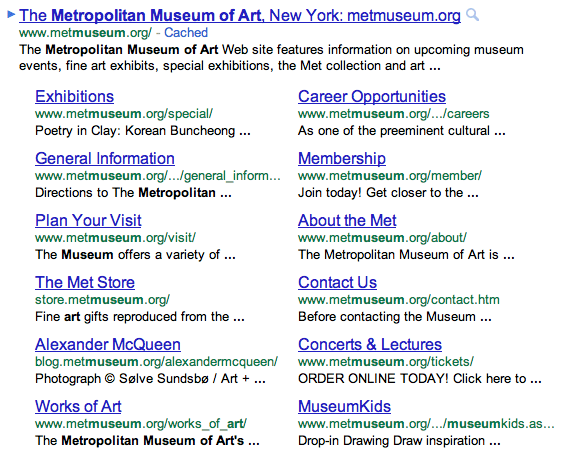
Google changes Sitelinks, top search result spot gets more important

Google is changing Sitelinks, the links below a search result with access to other pages of the same site.

Changes include:
- Sitelinks are now full-size links with a URL and one line of snippet text.
- Links have increased from a maximum of 8 links to 12, revealing more about the websites you are searching for.
- Sitelink ranking is now also combined with regular result ranking to produce higher quality searches.
- Sitelinks also vary based on your query, where a more comprehensive keyword search will return better results.

This basically means more power to the top 1-2 results if they use sitelinks, as they grab more above-the-fold space. This will increase the need for a SEO strategy that will get your site on the top spot of the desired keywords / phrase (and of course refuel the discussion on whether this is a good move as it will be slightly harder for users to see a more diverse choice of results)

More at The evolution of sitelinks: expanded and improved - Official Google Blog and Google improves sitelinks for better search results - The Next Web

Friday, 19 August 2011

Rain or shine, see the weather in Google Maps


It's strange but after my recent post on maps I keep finding new advances on the issue. Google today announced a weather layer for Google Maps.
Whether you’re organizing a trip overseas or a picnic at a local park, knowing the weather forecast is a crucial part of the planning process. Today, we’re adding a weather layer on Google Maps that displays current temps and conditions around the globe, and will hopefully make travel and activity planning easier.

Full article Google LatLong: Rain or shine, see the weather in Google Maps.

Tuesday, 19 July 2011

Google+ vs Facebook: The xkcd test

Xkcd is one of my favorite comics, so sharing a good strip is part of my "sharing agenda". Facebook has traditionally a problem with xkcd.com pages.